Voice Activity Detection (VAD)

Eric King
Author
Voice Activity Detection (VAD) is a signal processing technique used to automatically determine whether a given segment of audio contains human speech or silence/background noise. In speech systems, VAD acts as a preprocessing stage that separates speech regions from non-speech regions before further processing such as Automatic Speech Recognition (ASR), speech translation, or speaker analysis.
1. What is Voice Activity Detection?
Voice Activity Detection (VAD) is a fundamental component of modern speech processing systems. It performs a binary classification task: for each short audio frame, it determines whether the frame contains speech or non-speech (silence, noise, music, etc.).
The core principle is straightforward:
Audio frame → VAD model → P(speech)
If the probability exceeds a predefined threshold, the frame is classified as speech; otherwise, it is classified as non-speech.
2. Why VAD Is Important
Raw audio signals often contain:
- Long periods of silence
- Background noise
- Non-speech sounds (music, clicks, breathing)
Feeding such audio directly into ASR models leads to:
- Wasted computation on processing silence and noise
- Lower recognition accuracy due to noise interference
- Unstable segmentation and punctuation errors
- Higher processing costs from unnecessary computation
By removing non-speech segments, VAD significantly improves both efficiency and accuracy of downstream speech models.
3. Typical VAD Processing Pipeline
The VAD processing pipeline follows these steps:
- Raw Audio →
- Framing (10–30 ms) →
- Feature Extraction →
- Speech Probability Estimation →
- Temporal Smoothing →
- Speech Segment Generation
3.1 Framing
The audio signal is divided into short overlapping frames (commonly 20 ms) to capture short-term acoustic characteristics. This framing allows the system to analyze audio in manageable chunks while preserving temporal information through overlap.
3.2 Feature Extraction
Common features used in VAD include:
- Short-time energy - Measures the power of the signal
- Zero-crossing rate - Indicates the frequency content
- Spectral entropy - Measures the randomness in the frequency domain
- Log-Mel filterbanks - Used in neural network-based VADs for better representation
These features help distinguish speech from non-speech sounds by capturing different acoustic properties.
3.3 Speech Probability Estimation
A model (rule-based or neural network) estimates the likelihood that each frame contains speech. This probability is then compared against a threshold to make the final decision.
3.4 Temporal Smoothing
Frame-level decisions are merged into continuous speech segments using temporal rules:
- A speech segment starts when speech probability remains above the threshold for a minimum duration
- A speech segment ends when silence persists longer than a predefined silence duration
This avoids frequent switching between speech and silence due to noise or brief pauses.
4. From Frames to Speech Segments
Frame-level VAD decisions need to be converted into continuous speech segments. The system applies temporal smoothing rules:
- Speech onset: A speech segment starts when speech probability remains above the threshold for a minimum duration
- Speech offset: A speech segment ends when silence persists longer than a predefined silence duration
This approach prevents fragmentation caused by brief noise or pauses within actual speech.
5. Padding and Boundary Adjustment
To prevent cutting off speech onsets and offsets, VAD systems usually apply padding:
- Add a small margin (e.g., 100–300 ms) before and after detected speech segments
- This improves naturalness and recognition accuracy
- Helps capture complete words and phrases that might be partially cut off
Proper padding ensures that the beginning and end of speech segments are not truncated, which is crucial for accurate transcription.
6. Types of VAD Algorithms
6.1 Rule-Based VAD
Rule-based VAD systems use handcrafted acoustic features and simple decision rules:
- Advantages: Lightweight and fast, suitable for resource-constrained environments
- Disadvantages: Less robust to noise and varying acoustic conditions
These systems work well in controlled environments but struggle with real-world noise.
6.2 Statistical Model-Based VAD
Statistical approaches use probabilistic models:
- Gaussian Mixture Models (GMM) - Model the distribution of speech and non-speech features
- Hidden Markov Models (HMM) - Capture temporal dependencies between frames
These methods provide better robustness than rule-based systems but require more computational resources.
6.3 Neural Network-Based VAD (Modern Standard)
Modern VAD systems use deep learning architectures:
- CNN / RNN / Transformer architectures
- Trained on large, noisy datasets
- Highly robust across diverse environments
Examples of modern VAD systems:
- WebRTC VAD - Widely used in real-time communication
- Silero VAD - High-performance neural VAD with multilingual support
Neural network-based VAD has become the standard for production systems due to its superior accuracy and robustness.
7. VAD in ASR Systems
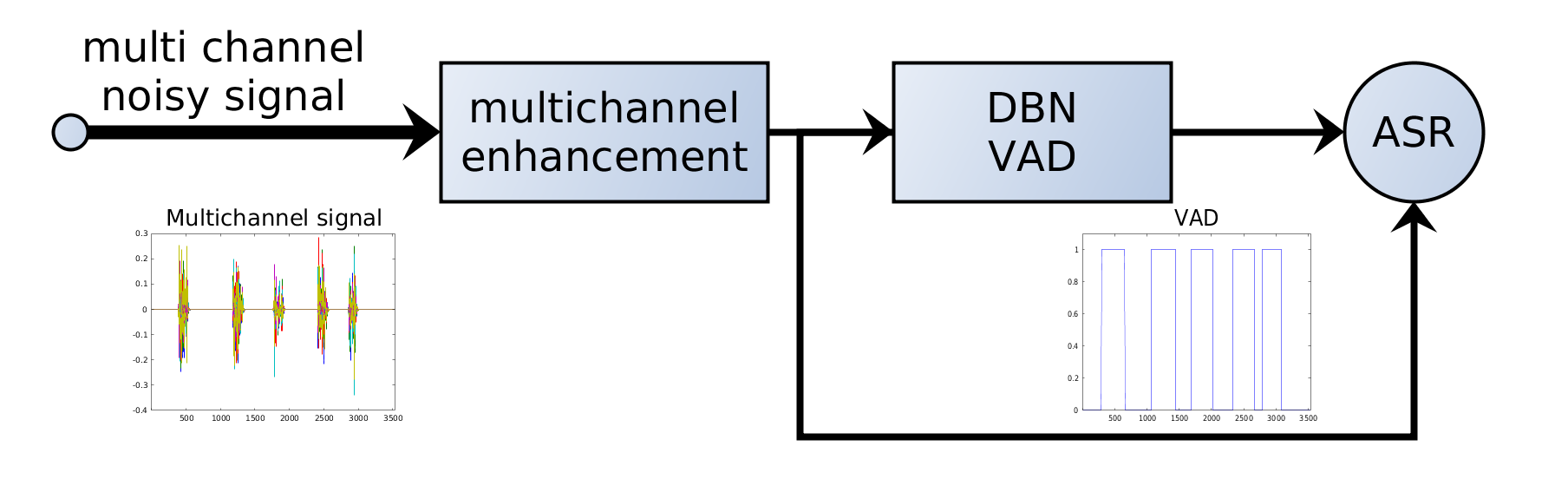
In modern ASR pipelines, VAD is typically applied before speech recognition:
Audio → VAD → Speech Segments → ASR Model → Transcription
This design provides several benefits:
- Reduces ASR inference time by processing only speech segments
- Improves decoding stability by avoiding noise interference
- Enables parallel processing of long audio files by segmenting them
VAD acts as a gatekeeper, ensuring that only relevant audio segments are sent to the computationally expensive ASR model.
8. VAD and Timestamp Alignment
Each detected speech segment preserves its original start and end time. After transcription, segment-level timestamps are mapped back to the global timeline, ensuring accurate:
- Subtitle generation with precise timing
- Audio-text alignment for applications like video editing
- Speaker diarization and segmentation
This timestamp preservation is crucial for applications that require precise synchronization between audio and text.
9. Practical Considerations
Key parameters that affect VAD behavior:
- Frame length - Duration of each audio frame (typically 10-30 ms)
- Speech probability threshold - Minimum probability to classify as speech
- Minimum speech duration - Shortest allowed speech segment
- Minimum silence duration - Duration of silence to end a speech segment
- Padding length - Margin added before and after speech segments
These parameters should be tuned based on the application scenario:
- Meetings: Longer silence tolerance, multiple speakers
- Podcasts: Clear speech, minimal background noise
- Call centers: Noisy environments, varying audio quality
Proper parameter tuning is essential for optimal VAD performance in different use cases.
Conclusion
Voice Activity Detection is a foundational component of speech processing systems. By accurately detecting when speech occurs, VAD enables downstream models such as ASR to operate more efficiently, accurately, and reliably.
In production-grade speech systems, VAD is not optional—it is essential. Modern neural network-based VAD systems have made significant advances in robustness and accuracy, enabling reliable speech processing across diverse real-world conditions. As speech technology continues to evolve, VAD will remain a critical preprocessing step that ensures optimal performance of the entire speech processing pipeline.
