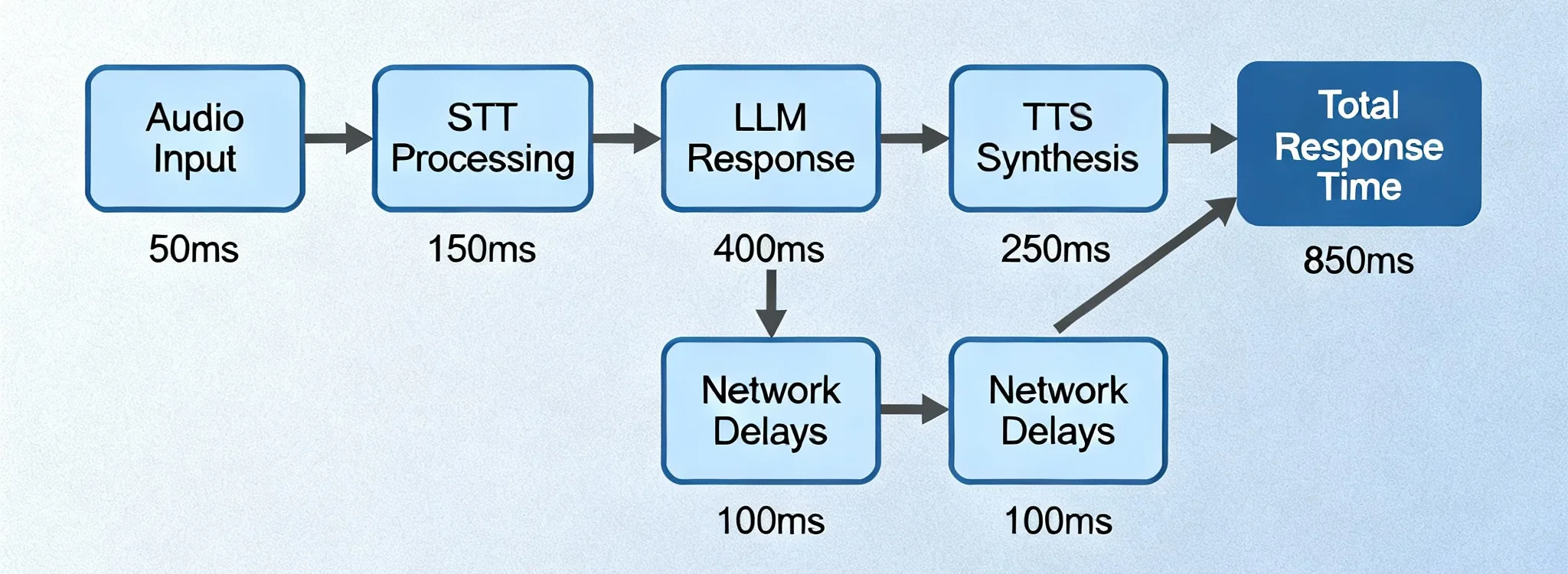
Low Latency Speech Recognition: Real-Time Speech to Text with SayToWords

Eric King
Author
Welcome to SayToWords!
SayToWords is an AI-powered platform that converts speech into text with extremely low latency.
It is designed for users who need fast, real-time transcription without sacrificing accuracy.
It is designed for users who need fast, real-time transcription without sacrificing accuracy.
Whether you are transcribing meetings, podcasts, live streams, or customer calls, low latency speech recognition ensures your text appears almost instantly as the audio is spoken.
🚀 What Is Low Latency Speech Recognition?
Low latency speech recognition means converting spoken audio into text with minimal delay—often within milliseconds.
In practical terms, it allows:
- Near real-time subtitles
- Live meeting captions
- Instant voice command feedback
- Fast AI-powered note-taking
The lower the latency, the more natural and responsive the user experience feels.
⏱ Understanding Latency in Speech-to-Text
Latency is the time gap between:
When a word is spoken → When it appears as text
- High latency results in delayed captions and poor usability
- Low latency delivers smooth, real-time transcription
Modern AI systems aim to keep this delay as small as possible while maintaining accuracy.
⚡ Why Low Latency Matters
Low latency speech recognition is essential for:
🎙 Live Meetings & Conferences
Participants rely on instant captions for accessibility and clarity.
📺 Live Streaming & Broadcasting
Delayed subtitles reduce engagement and viewer trust.
🤖 Voice Assistants
Fast transcription makes voice interactions feel natural.
📞 Customer Support & Call Centers
Real-time transcripts help agents respond faster and smarter.
🧠 How SayToWords Achieves Low Latency
SayToWords is built with a speed-first AI transcription pipeline.
✅ Optimized AI Models
We provide multiple transcription models designed for different latency needs:
- Fastest Model – ultra-low latency, ideal for real-time use
- Balanced Model – fast with strong accuracy
- Accurate Model – highest accuracy for long or complex audio
You can choose the model that best fits your use case.
✅ Chunk-Based Audio Processing
Audio is processed in small segments, allowing text to appear progressively instead of waiting for the full file to finish.
This significantly reduces perceived waiting time.
✅ Pre-Configured Language Settings
By selecting the spoken language in advance, SayToWords avoids extra detection steps, further reducing processing delay.
🛠 How to Use Low Latency Speech Recognition on SayToWords
📌 Step 1: Upload Your Audio or Video
After logging in, go to the dashboard and click “Transcribe Audio / Video”.
Supported formats include:
- MP3
- WAV
- M4A
- MP4
- MOV
📌 Step 2: Choose a Fast Transcription Model
To minimize latency:
- Select Fastest Model for live or short recordings
- Select Balanced Model for real-time accuracy
📌 Step 3: Set Language and Speaker Options
- Choose the spoken language
- Enable Speaker Recognition if your audio has multiple speakers
These settings help optimize both speed and accuracy.
📌 Step 4: Start Transcription
Click Transcribe and your text will appear almost instantly.
You can view, edit, and refine the transcript as processing continues.
⚖️ Accuracy vs Latency: Choosing the Right Model
Different scenarios require different trade-offs:
| Use Case | Recommended Model |
|---|---|
| Live meetings | Fastest |
| Podcasts | Balanced |
| Interviews | Accurate |
| Legal or research | Accurate |
SayToWords gives you full control over this balance.
🌍 Common Use Cases
Low latency speech recognition with SayToWords is ideal for:
- Live captions and subtitles
- Real-time meeting notes
- Streaming content transcription
- Customer support monitoring
- AI-powered voice workflows
🔒 Reliable, Scalable, and Easy to Use
SayToWords is built for individuals and teams:
- Secure file handling
- Scalable infrastructure
- Multi-language support
- Browser-based, no installation required
🎯 Final Thoughts
Low latency speech recognition is the foundation of modern real-time communication.
With SayToWords, you get:
- ⚡ Fast, low-latency speech-to-text
- 🎯 High-quality AI transcription
- 🌐 Multi-language support
- 🧠 Smart speaker recognition
Start using SayToWords today and experience real-time transcription without waiting.
Happy transcribing! 🎧✍️


