Introducing Our New Text-to-Speech Feature: A Game Changer in Voice Synthesis

Eric King
Author
In today's fast-paced digital world, communication is key, and the way we present information matters more than ever. Whether you're building a website, an app, or simply looking to enhance user experience, having a rich and interactive voice component can make all the difference. That's why we're excited to introduce our latest feature: Text-to-Speech (TTS).
1. What is Text-to-Speech?
Our newly developed Text-to-Speech feature allows users to convert any given text into spoken audio. What's more, it provides an exciting level of personalization, enabling you to generate not just basic speech, but speech with rich emotion control. You can select a voice sample, input text, and instantly generate an audio clip that sounds both natural and expressive. The best part? You have full control over how the speech is delivered, with a variety of emotional tones to choose from.
2. How to Use the Text-to-Speech Feature
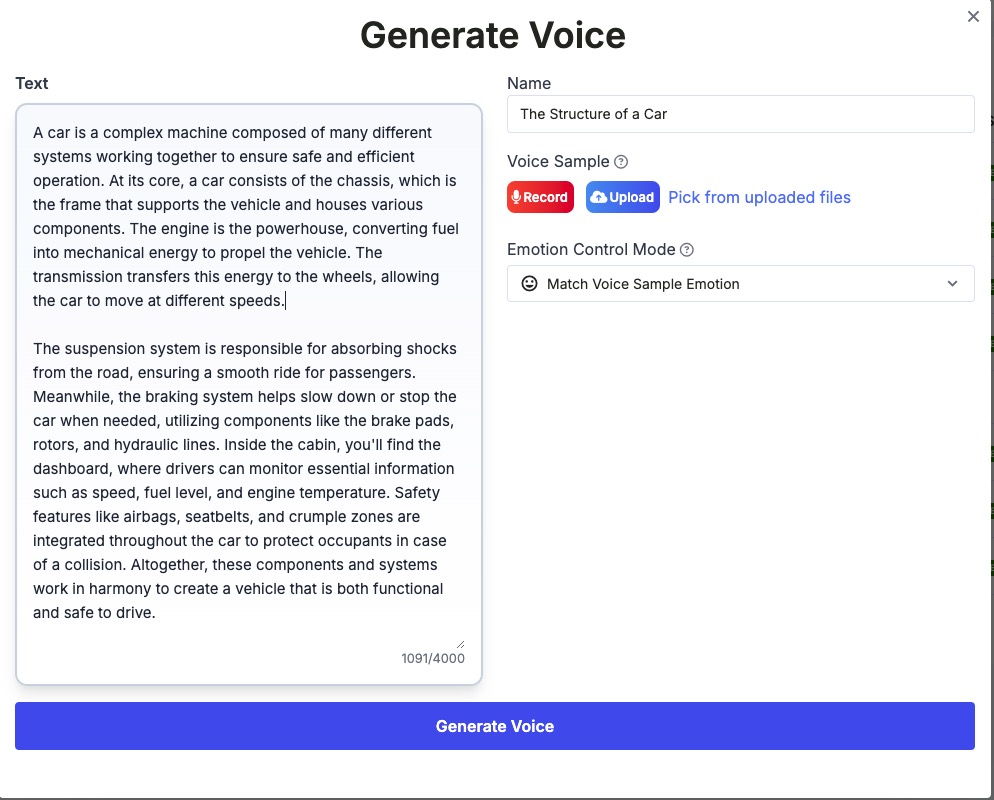
Using the new Text-to-Speech feature is simple and intuitive. Here's how you can get started:
-
Step 1: Input Your Text
- Start by typing or pasting the text you want to convert into speech. Whether it's a short sentence or a long paragraph, our system will handle it smoothly.
-
Step 2: Select a Voice Sample
- Next, you have the option to choose a voice sample. You can either upload a pre-recorded voice or use the record option to record your own voice. The selected voice sample will serve as the base for the emotional tone of the speech.
-
Step 3: Choose the Duration
- You can also adjust the audio length. For best results, we recommend keeping the audio clip around 5 seconds. This ensures the generated voice remains clear and expressive, making it perfect for short messages or notifications.
Once you’ve entered your text, chosen your voice sample, and selected the desired duration, simply hit Generate and voila! The system will process the request and provide you with a high-quality audio file in a matter of seconds.
3. Emotion Control: How It Works
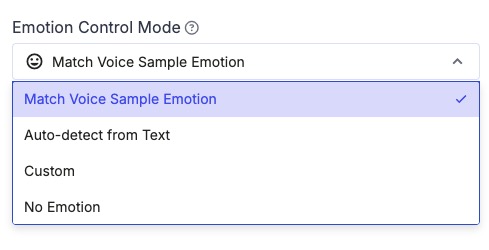
One of the most exciting aspects of our new Text-to-Speech feature is the ability to control the emotion and tone of the generated voice. We've developed four distinct modes for emotion control, giving you plenty of flexibility to match the mood of the content.
-
Mode 1: Match Voice Sample Emotion
- This mode allows the speech to match the emotion of the voice sample you’ve selected. For example, if you choose a voice sample that sounds cheerful, the generated speech will carry that same cheerful tone.
-
Mode 2: Auto-detect Emotion from Text
- In this mode, the system automatically detects the emotion from the text you input. If your text conveys happiness or excitement, the voice will adapt to sound cheerful. Conversely, if the text reflects sadness or anger, the voice will match that mood.
-
Mode 3: Custom Emotion Control
- For a more tailored experience, we offer a custom emotion control option. You can adjust the speech to express one of eight different emotions:
- Happy
- Angry
- Sad
- Afraid
- Disgusted
- Melancholic
- Surprised
- Calm
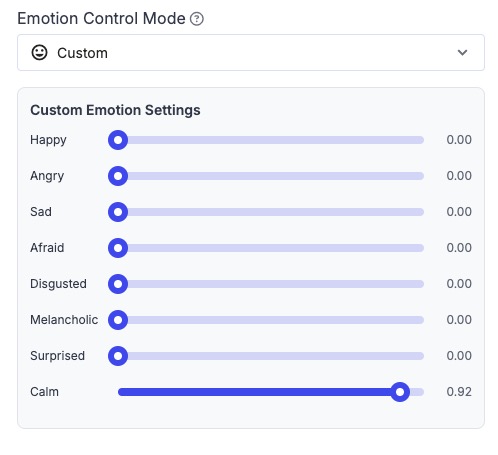 Choose one of these emotions, and the system will generate speech that perfectly reflects your desired mood.
 - For a more tailored experience, we offer a custom emotion control option. You can adjust the speech to express one of eight different emotions:
-
Mode 4: No Emotion (Neutral)
- Sometimes, you might just need neutral, emotionless speech—like a news broadcast. In this mode, the voice will remain calm and without any emotional intonation. It's perfect for scenarios where clarity and neutrality are crucial, such as formal announcements or news reports.
4. Why This Feature Matters
The ability to control the emotion of speech offers incredible possibilities for user engagement. Whether you're creating interactive voice-driven content, developing customer support bots, or simply adding some flair to your website or app, emotion-controlled speech can take your content to the next level.
Imagine a chatbot that can empathize with the user, or an e-learning platform that adapts the tone based on the lesson's content. From creating friendly, approachable voices for customer support to maintaining professionalism in official communications, this new Text-to-Speech feature is as versatile as it gets.
Conclusion
We’re thrilled to bring this new functionality to our platform, and we can’t wait to see how it enhances your projects. With a combination of simplicity, flexibility, and emotional depth, the Text-to-Speech feature is bound to be a valuable tool in your creative toolkit. Try it today and discover just how easy it is to bring text to life!


